
A guest checks in, and forty minutes later the message arrives: "Lovely place, but there was hair in the shower drain and the coffee pods were empty." You know your cleaner. They are good. They have done this place thirty times. But last Tuesday they were covering two extra jobs, moved fast, and the drain and the coffee were the two things that slipped. Neither of you did anything careless. There was just no list, so "everything" depended on one busy person remembering all of it, on the worst possible day to be relying on memory.
That is the case for a checklist in one sentence: your cleaning standard should not live in a single human's short-term memory. Not because the human is unreliable, but because memory is the part of the system that fails silently and only shows up in the review.
"My cleaner knows the drill" is not a system
The phrase every host says, right up until the day it breaks. Here is when "they know the drill" stops being true:
- A backup cleans instead. Your regular is sick or traveling, someone covers, and that person has never set foot in the place. They know how to clean. They do not know that your balcony counts, that the lockbox sticks, or that guests always ask about the coffee.
- You hire a new cleaner. Onboarding by text and a walkthrough you half-remember means the first month is a slow, expensive teaching loop, paid for in near-misses.
- A normal week gets busy. Even your best cleaner, on a five-turnover Sunday, is running on speed and habit. Habit skips the non-obvious.
- You add a second and third property. Now the "drill" is three different drills, and no one, including you, can hold three room-by-room standards in their head without dropping one.
A checklist fixes all four the same way: it moves the standard out of memory and into something you can hand to anyone.
A checklist turns your standard into something transferable
Write the list once and your standard stops being a thing people have to remember and becomes a thing they can follow. That is the entire point. The property, not the person, now carries the definition of "clean."
In BowReady you set a checklist per property. On every turnover, your Cleaning Pro sees those exact items on the same screen that already shows the address, the access code, and the deadline. They tap through them as they work.
What it does
- Shows a property's checklist on the cleaner's job screen, one tap per item.
- Locks the list to that turnover the moment they open it, so a later edit to the master list never reshuffles a clean in progress.
- Flags any unticked item when they tap Mark done, so nothing gets quietly skipped.
How it works
- You write the list once on the property, in the app or the web portal.
- Every future turnover for that property carries it automatically.
- Your Cleaning Pro just works down it. There is nothing for them to install or learn.
Supplies belong on the list too
Half the "the place was fine but" reviews are not about dirt. They are about the thing that ran out: toilet paper, coffee, dish soap, a single towel. The person who notices a supply is low is the cleaner, standing in the room. The person who can restock it is you. A checklist is where those two connect.
The cleaner does not have to text you, and you do not have to remember to ask. The flag travels with the turnover, and the item shows up on your restock list. A five dollar problem gets caught at the one moment someone is actually looking at the shelf.
Set it once, for every property
The objection to checklists is always effort: "I do not have time to build a list for each place." You build it once. And if your properties share a baseline, you set the common items for all of them in a single step, then fine-tune each one.
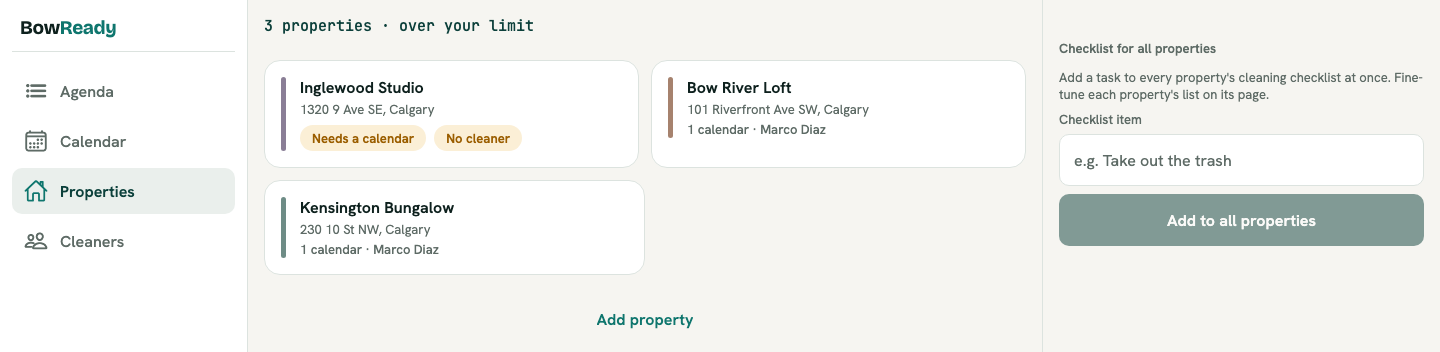
A ten-minute setup, done one time, is the price of never again explaining your standard by text at 9pm because a backup cleaner is standing in a property they have never seen.
The backup-cleaner case is the whole argument
BowReady already lets you name a backup cleaner per property, so a decline never leaves a turnover uncovered. But coverage is only half of it. A backup who shows up with no idea of your standard gives you a staffed turnover, not a good one. The checklist is what makes the backup's clean look like your regular's clean. Coverage plus a checklist is the difference between "someone was there" and "the place was ready."
Before and after
Before: your standard is a walkthrough you gave once, a few texts, and your cleaner's memory. It holds until the person or the week changes, then a drain or a coffee pod becomes a three-star line.
After: the standard is a list attached to the property. Your regular taps through it out of habit, a backup follows it exactly, a new hire is productive on day one, and a low supply is flagged the moment it is spotted. Nobody is relying on remembering everything, so nothing quietly gets missed.
"I thought a checklist was overkill for one cleaner I trust. Then she went on vacation, her cover used my list, and the place was spotless without a single text from me. That was when I built one for all three properties."
A host who added checklists after a good backup experience
Bottom line
A checklist is not paperwork and it is not a lack of trust. It is the one artifact that lets your cleaning standard survive the day the person, the pace, or the property count changes, which is exactly the day a room gets missed without one. It takes ten minutes to set up and a single tap per item to run. For something that directly protects your rating, that is not a nice-to-have. It is the cheapest must-have a listing has.
Build your first checklist in a few minutes, in the app or in the Web Portal on a bigger screen.
An undefined standard is one of seven failures that cost hosts a check-in. The others, and the mechanism against each, are in the seven ways a turnover gets missed.
Ready when your guests are.
Download BowReady and give every turnover a clear owner.
Frequently asked questions
Do I really need a checklist if I trust my cleaner?
Yes, and trust is not the reason to skip it. A checklist is for the turnovers your regular cleaner is not the one who shows up: a backup, a new hire, a rushed week. It protects the standard on the day the person changes, which is exactly when a room gets missed. A good cleaner appreciates a clear list, because it removes guesswork about what you actually want.
What should be on a short-term rental cleaning checklist?
The universal core is beds and linens, bathrooms, kitchen, trash, and restocking consumables, plus a final staged-and-photographed pass. Then add the property-specific items memory tends to drop: the finicky lock, the balcony, the hot tub filter, the welcome basket, the exact coffee brand. Those quirks are the ones that turn into reviews when they are skipped.
How does BowReady's checklist work?
You set a checklist once per property. On each turnover, your Cleaning Pro sees those items on the job screen and ticks them off, one tap each. The list locks to that turnover when they open the job, so editing the master list later never reshuffles a clean already underway. If items are still unticked when they tap Mark done, BowReady flags it before the turnover is marked complete.
Does my cleaner have to install or learn anything?
No. The checklist appears right on the job they already opened, alongside the address, access code, and deadline. There is nothing for your cleaner to set up, no separate app, and no training. You build the list, they tap through it.