
It is 9pm on a Friday. A guest checks out Sunday at 11am and the next one arrives at 3pm. You text your cleaner to confirm, and the reply comes back: "So sorry, I'm out of town this weekend, can you find someone else?" Now you are scrolling your contacts, texting two other cleaners you barely know, and refreshing your phone while the clock runs down on a four hour window.
One cleaner is one point of failure. The fix is not to text harder. It is to give every property a second name before you ever need it, and let the app do the handoff.
The short version
- Set a primary cleaner and an optional backup for each property.
- Every turnover is born owned by the primary, with reminders on assignment, 24 hours before, and 2 hours before.
- If the primary declines, the same job hands to the backup automatically, and you are told.
- If nobody is left to cover it, the job is flagged at-risk and rises to the top of your list.
Why a single cleaner is a single point of failure
Most self-managing hosts run on one cleaner and a text thread. It works right up until the weekend that cleaner is sick, traveling, or already booked solid. The problem is not the decline itself. Cleaners have lives, and a good one telling you early is doing you a favor. The problem is what the decline sets off: a manual scramble, at the worst possible time, with no system underneath it.
A backup cleaner turns that scramble into a non-event. You decide who covers, once, in a calm moment. The app remembers.
Primary plus backup, set once per property
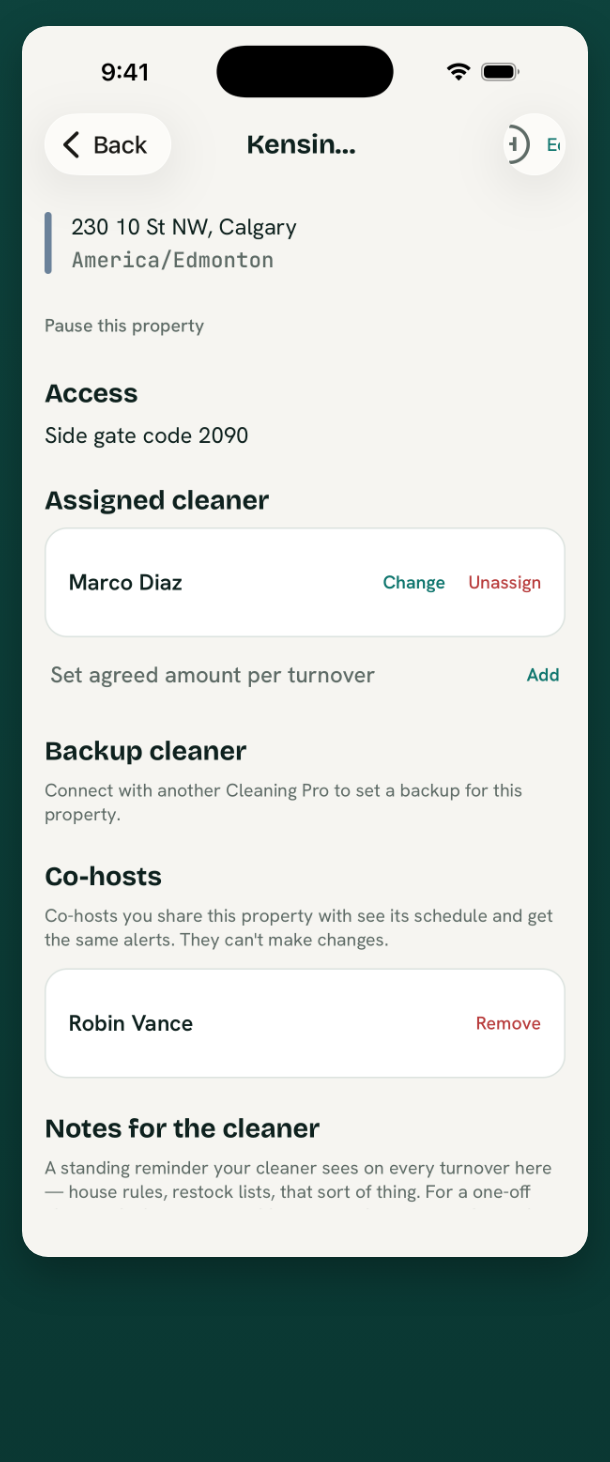
Open a property and you will see who owns its turnovers and who covers if they can't.
What it does
- Names a primary cleaner who owns every turnover for that property by default.
- Names an optional backup who steps in only if the primary declines.
- Keeps exactly one owner on each job at any moment, so a date never ends up with two competing jobs.
How it works
- You connect with a cleaner once (they accept an invite), then assign them as primary.
- Add a backup the same way. The backup does nothing and hears nothing until they are actually needed.
- New turnovers created from your calendars are automatically owned by the primary, no per-job assigning.
How the automatic handoff works
When the primary declines a turnover, BowReady does not open a new job or ask you to re-enter anything. It moves the existing job to the backup on the same row, so your one-per-date rule stays intact. The backup gets a push notification with the address, the access code, and the deadline. You get a short "reassigned" update.
The handoff only runs one way, primary to backup. The backup has no further backup, so there is no loop and nothing to untangle. If the person holding the backup slot also declines, the turnover is genuinely at risk, and BowReady says so plainly instead of pretending it is covered.
The host sees coverage at a glance
You should not have to open each property to know whether the weekend is handled. The host home screen leads with what needs you.
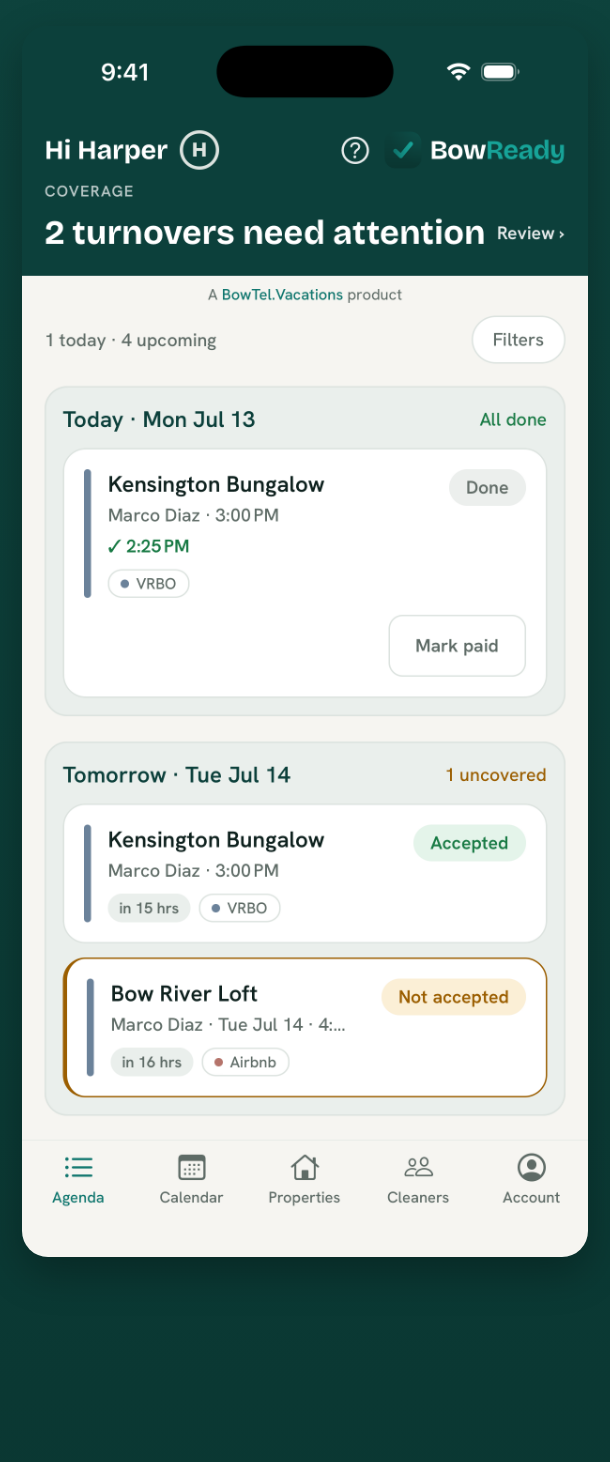
Jobs that are declined or not yet accepted sort to the top, with a clear "uncovered" or "needs attention" label. Accepted jobs sit calmly below. Color means status, not decoration, so a glance tells you where the risk is.
Before and after
Before: your cleaner declines Sunday's turnover by text at 9pm Friday. You text two other people, wait, chase, and finally confirm someone at 8am Sunday, having lost a night of sleep over a room that a guest will walk into at 3pm.
After: your cleaner taps decline in the app. The same job hands to your backup, who accepts it Saturday morning. You see one line: "Kensington Bungalow reassigned to your backup." You never left the couch.
"I used to keep a mental list of who I could beg on short notice. Now I set a backup once per place and the app just moves the job over. The first time it happened I did not even notice until I saw the note."
A two-property host in Calgary
Bottom line
A decline is not an emergency when there is already a name behind the first one. Set a primary and a backup per property, and the day a cleaner says no becomes a single notification instead of a lost evening. That is the whole point of the pipeline: a guest should never walk into an unclean room because a plan had no second layer.
Prefer to work from a laptop? The same coverage view lives in the Web Portal, with nothing to install.
A decline is the failure hosts fear most, but it is not the most common one. For the full list, and where each fix stops working, see the seven ways a turnover gets missed.
Ready when your guests are.
Download BowReady and give every turnover a clear owner.
Frequently asked questions
What happens when my cleaner declines a job?
If you set a backup cleaner for that property, BowReady reassigns the same job to the backup automatically. The backup is notified, and you get a "reassigned" update so you know coverage is handled without lifting a finger.
Can two cleaners hold the same turnover at once?
No. Every turnover has exactly one owner at any moment. A property has a primary cleaner and an optional backup, and the job moves from one to the other, never splitting into two rows or putting two jobs on the same date.
What if the backup can't take it either?
Then the turnover is flagged as at-risk and surfaces to the top of your list so you can step in, reassign to someone else, or cover it yourself. Nothing goes silent.
Does setting a backup cost extra?
No. Primary and backup assignment is part of BowReady, which is free for your first two properties and always free for your cleaners. You pay your cleaner directly, outside the app.