
A turnover in BowReady is one clean between two guests. It starts when a booking syncs and ends as a line in your History. Along the way it can be accepted, declined, moved, inspected and paid.
This guide follows one clean through every step and shows what your agenda looks like at each one. The screenshots use example properties and names.
Your agenda, top to bottom
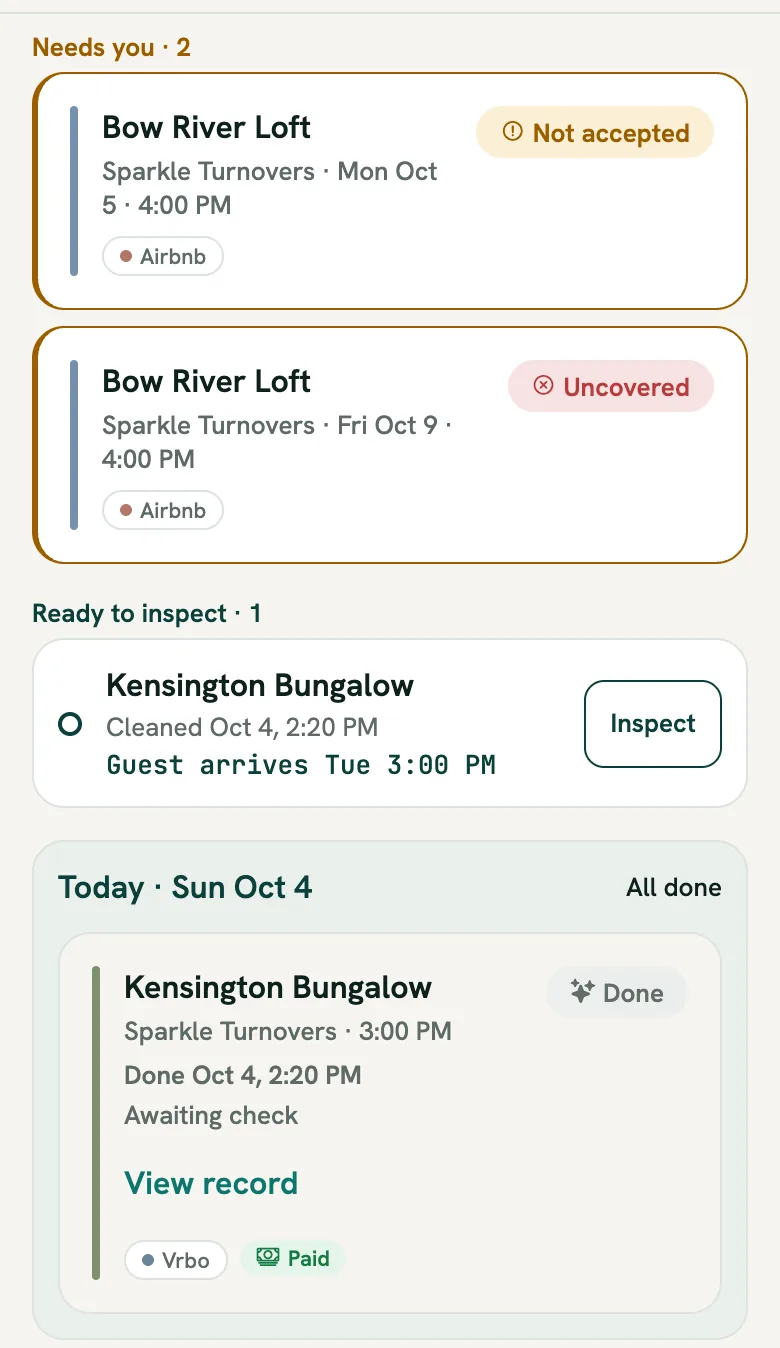
Your agenda is built as a work list. What needs you sits at the top, and the calm parts sit lower down.
- Needs you. A clean your cleaner has not accepted yet, a clean with nobody on it, or a re-clean you asked for. These stay pinned here whatever their date, and they also appear in their own day further down.
- Ready to inspect. Finished cleans waiting for your check, soonest guest first. This group only appears for properties where you turned inspections on.
- Today and Tomorrow. The two days that matter most, with their full cards.
- Upcoming. The next 7 days, open, grouped by day. Tap Show the next 7 days to look further ahead.
- Overdue. Anything whose day has passed without being finished, so a missed clean is never buried.
- History. Every finished clean, one line each.
Step 1: A booking becomes a clean
You never type in a clean for a normal stay. Once a property's booking calendar is connected (Airbnb, VRBO, Hostaway or any iCal link), BowReady checks it regularly. Every checkout becomes a clean on that day, usually within an hour of the booking appearing.
If you list the same property on more than one site, the same checkout collapses to one clean across your synced calendars. Your cleaner is pinged once, not twice.
Step 2: It goes to your cleaner
Each property has a primary cleaner, and you can add an optional backup. A new clean goes straight to the primary. They get a notification naming the property, the date and when the cleaning window starts.
Most cleaners accept automatically: it is on by default, and they can turn it off for any host. When it is off, the clean shows Not accepted under Needs you until they tap Accept.
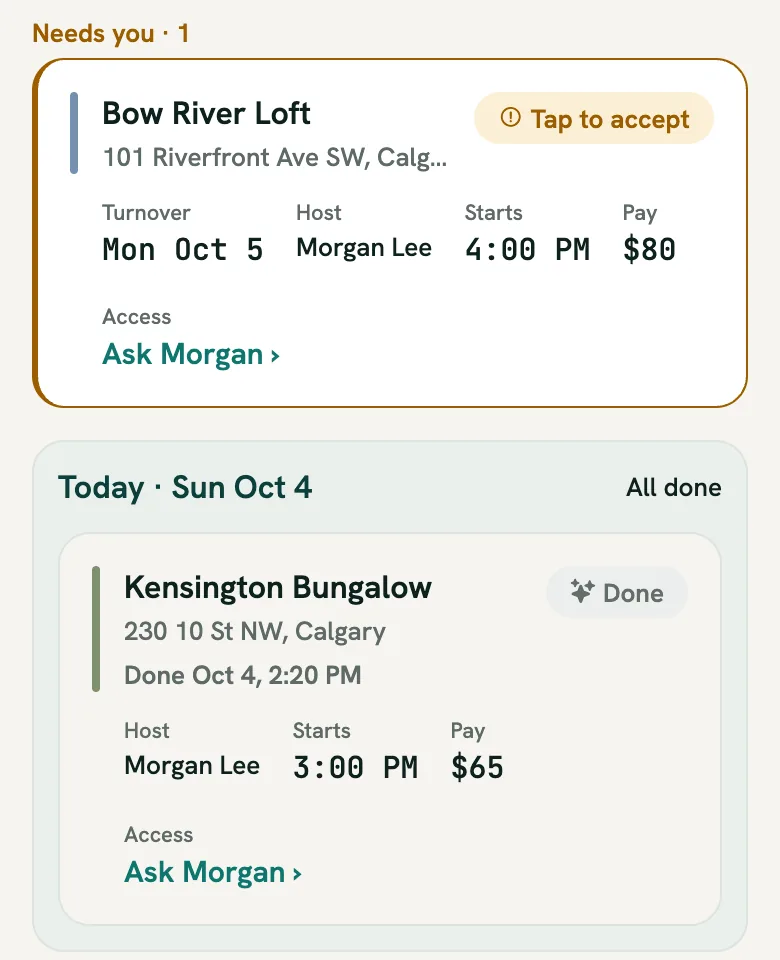
Your cleaner's agenda is laid out the same way as yours. Anything waiting on them is at the top, then Today, Tomorrow and the week ahead. Each job shows the address, your name, the start time and the agreed pay.
Before the clean, they are reminded 24 hours and 2 hours ahead, in the property's local time.
Step 3: If your cleaner can't take it
Plans change. When your cleaner declines, they can add a short reason, and what happens next depends on whether the property has a backup.
- With a backup, the same clean moves to the backup. You get a notification that it was reassigned, and there is nothing else for you to do.
- Without a backup, the clean shows Uncovered under Needs you.
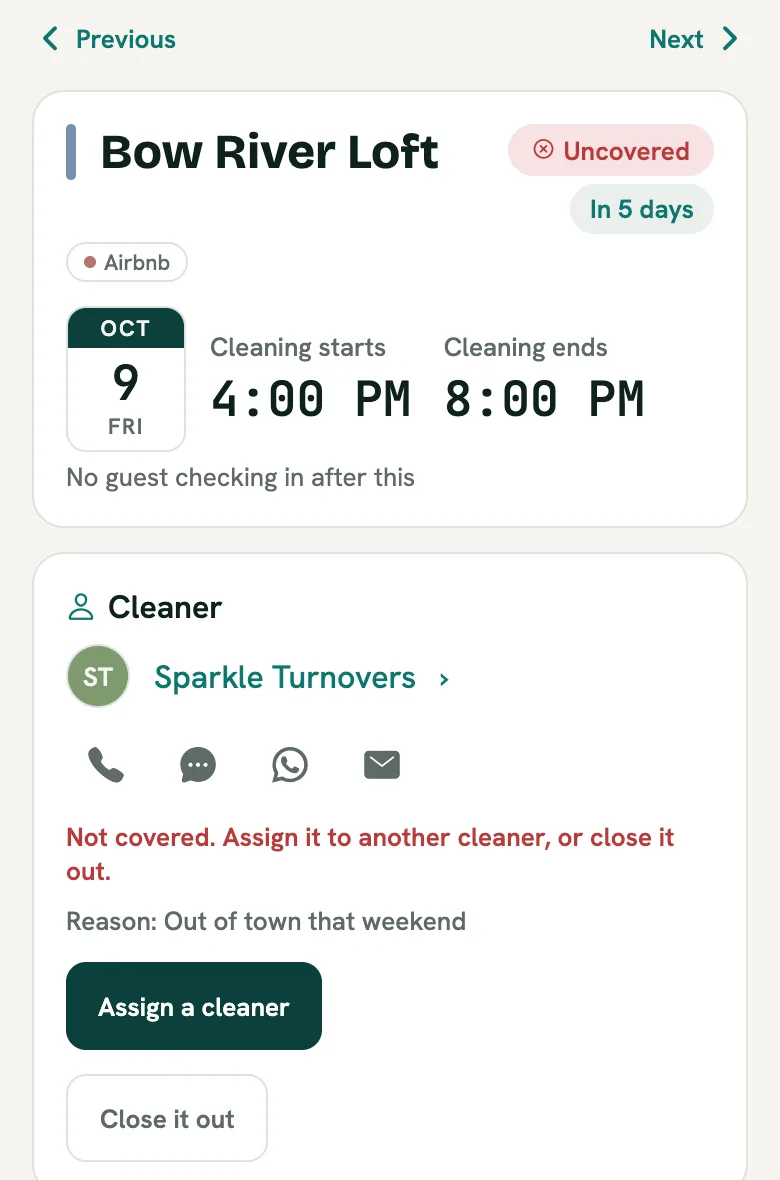
Open it and you see the reason, plus two ways forward:
- Assign a cleaner sends this one clean to someone else, or to you if you will do it yourself. The property's usual cleaner stays the same.
- Close it out when the clean is not needed, for example because the owner is staying.
Setting a backup for each property is the single best way to keep this list empty.
Step 4: When the booking changes
Bookings move. BowReady keeps checking the calendar, so:
- A moved booking moves the clean, and your cleaner is told the new date. Old reminders for the previous date are dropped.
- A cancelled booking cancels the clean. Your cleaner hears about it only if they had already accepted it, so nobody gets a message about a job they never took on.
- An early checkout or a late one is yours to handle. Open the clean, tap Change the day, and your cleaner is told.
Step 5: The day of the clean
On the day, your cleaner opens the job and taps Start. If you set a checklist for the property, they tick it as they go, room by room. They photograph each room as they finish it, and each photo is stamped with the time it was taken.
When they tap Mark done, you get a notification and the card turns to Done with the time. Finished cards step back to a quieter look, so the cleans still in progress stand out.
Every finished clean also has a Turnover Record: one page with the times and the photos. If a guest ever says the place was not clean, open the clean, tap View record, and share it.
Step 6: Inspecting the clean
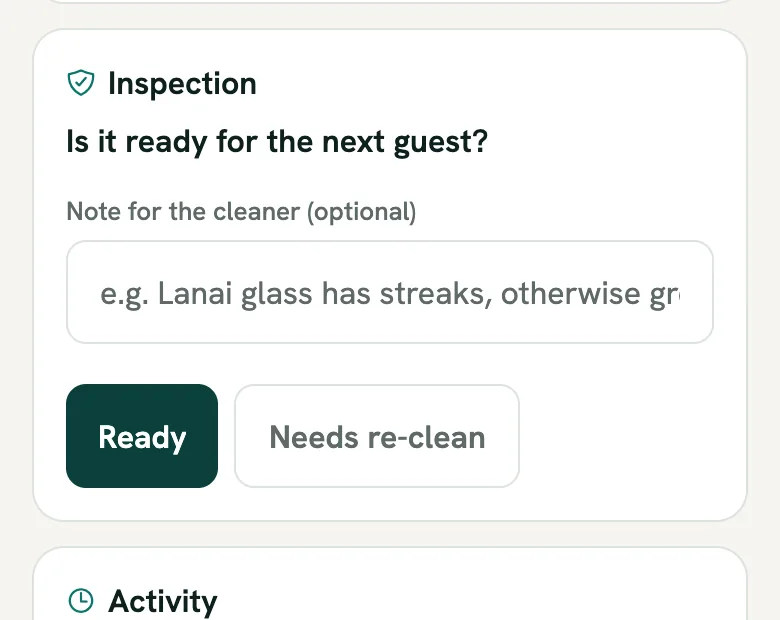
If you like to check a property before the next guest, open the property and turn on inspections. You can also name someone else to inspect, a co-host for example.
Once the clean is done, it appears under Ready to inspect with the time it was cleaned and when the next guest arrives. That arrival is your deadline, so the soonest one is listed first. Tap Inspect and answer one question: Is it ready for the next guest?
- Ready records it, and the clean leaves Ready to inspect.
- Needs re-clean sends your cleaner a notification with your note. On their agenda the job sits under Needs you with Host asked for a re-clean, until the next guest arrives.
No time to inspect? That is fine. Once the next guest arrives, the clean is simply recorded as not inspected. Nobody is chased about it, and your cleaner is never shown it as a mark against them.
Step 7: Paying your cleaner
Set an agreed amount per clean on the property, and your cleaner sees it on every job. When you settle up, tap Mark paid on the finished clean, or mark a whole month paid from your spend report. You both see the date and the amount.
BowReady takes nothing per clean and never sits between you. How you pay is up to the two of you.
Step 8: History
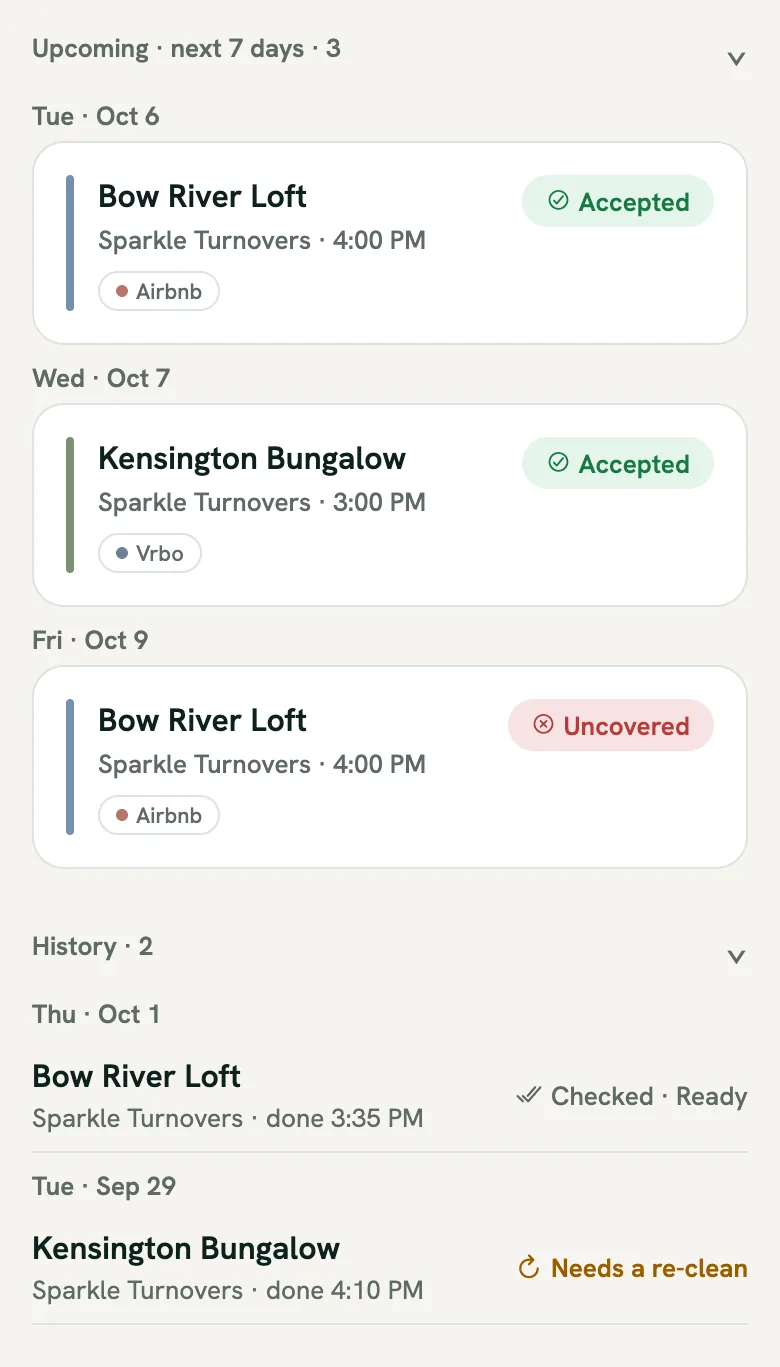
Finished cleans move into History at the bottom of your agenda, one line each under their day. Each line shows who cleaned and when, and on the right how it ended: Checked · Ready, Needs a re-clean, Not inspected, or Paid.
Cancelled cleans are left out, because they never happened. Tap any line to open the full clean with its photos and record.
Quick checklist
- Connect each property's booking calendar so checkouts become cleans on their own.
- Set a primary cleaner, and a backup wherever you can.
- Turn on inspections for the properties you like to check before guests arrive.
- Look at Needs you first each morning. When it is empty, nothing is at risk.
- Use Ready to inspect before each arrival, and History when you need to look something up.
See your own week this way
Connect a calendar, add your cleaner, and your turnovers start showing up on their own.
Frequently asked questions
Do I have to create each clean by hand?
No. Once a property's booking calendar is connected, every checkout becomes a clean on its own, usually within an hour of the booking appearing. You can still add one by hand for an owner stay or a deep clean.
What happens if my cleaner declines?
If you set a backup for the property, the same clean moves to the backup and you are told it was reassigned. With no backup, it shows as Uncovered at the top of your agenda under Needs you, where you can assign someone else, clean it yourself, or close it out.
What if the guest changes their dates?
The clean moves with the booking and your cleaner is told the new date. If the booking is cancelled, the clean is cancelled too, and your cleaner hears about it only if they had already accepted it.
Do I have to inspect every clean?
No. Inspections are off until you turn them on for a property. When they are on, a finished clean waits under Ready to inspect until you record a verdict or the next guest arrives. If the guest arrives first, it is simply recorded as not inspected. Nobody is chased about it.
Does my cleaner see my inspection result?
Only when you ask for a re-clean. They get a notification and the job shows "Host asked for a re-clean" until the next guest arrives. A Ready verdict is never shown to them as a grade on their work.
Does BowReady handle the payment?
No. You set an amount per clean and mark a clean paid when you settle up, so you both see the date and amount. BowReady takes nothing per clean and moves no money between you.